
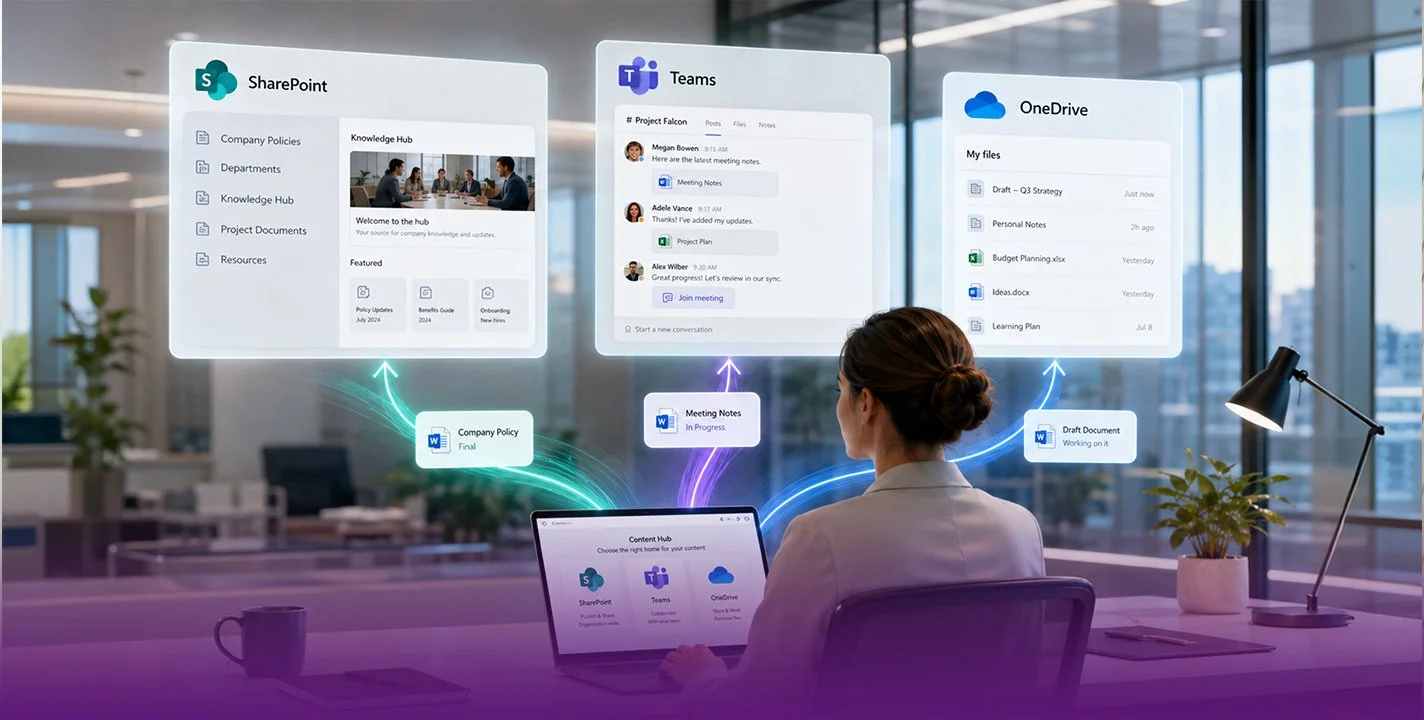
In 2026, Microsoft’s platform has become the central hub for enterprise productivity, featuring integrated artificial intelligence, process automation, and a completely redesigned architecture.

Today, in the corporate environment, information circulates constantly and teams work from different locations. Having a solid platform to manage documents and collaborate is essential. Microsoft SharePoint has established itself as one of the most powerful tools for document management, internal communication, and collaboration in organisations of all sizes.
From its integration with Microsoft 365 to its advanced automation and security capabilities, SharePoint enables companies to centralise information, optimise processes, and improve team productivity.
In this article, we will analyse in depth what Microsoft SharePoint is, its main capabilities, and the advantages it offers to modern organisations.
Microsoft SharePoint is an enterprise collaboration and content management platform developed by Microsoft. Its primary objective is to enable organisations to store, manage, share, and collaborate on documents and information within a centralised and secure environment.
Through SharePoint, companies can create corporate intranets, communication portals, document libraries, and collaborative workspaces that facilitate access to information and improve coordination between teams.
One of its greatest strengths is its native integration with tools such as:
Microsoft Teams
Microsoft OneDrive
Microsoft Power Automate
Microsoft Power Apps
This integration allows SharePoint to become the central hub for document management and collaboration within the Microsoft ecosystem.
One of SharePoint’s most important functions is advanced document management.
Companies can store files in document libraries organised by departments, projects, or work areas. This allows employees to easily access the information they need without relying on emails or scattered files.
Key features include:
Document version control
Change history
Real-time co-authoring
Advanced search
Metadata and automatic classification
Thanks to these capabilities, teams can work in a more structured way and avoid common issues such as file duplication or the use of incorrect versions.
SharePoint also enables the creation of modern, customised corporate intranets.
These intranets act as internal communication hubs where employees can find company news, policies, resources, important documents, and relevant announcements.
SharePoint intranets can include:
Corporate news
Event calendars
Employee directories
Training resources
Access to business applications
This significantly improves organisational transparency and information flow within the company.
Collaboration is one of the pillars of SharePoint.
Teams can work simultaneously on documents using integrated Microsoft tools such as Microsoft Word, Microsoft Excel, and Microsoft PowerPoint.
This means that multiple users can edit a file at the same time, view changes in real time, and leave comments or suggestions.
This type of collaboration is particularly useful for:
Remote teams
Multi-department projects
Corporate document reviews
Proposal or report development
Another major advantage of SharePoint is its ability to automate business processes.
Through integration with Microsoft Power Automate, organisations can create automated workflows that reduce manual tasks and improve efficiency.
Examples of automation include:
Document approvals
Internal request management
Automatic notifications
Contract review workflows
Employee onboarding processes
These automations enable organisations to save time and reduce human error in administrative processes.
Security is a priority for any organisation handling sensitive information.
SharePoint offers advanced access control systems, allowing administrators to define which users or groups can view, edit, or share specific documents or sites.
Key security capabilities include:
Granular permissions at file or folder level
Integration with corporate identities
Role-based access control
Data loss prevention
Auditing and activity logs
Additionally, as part of the Microsoft 365 ecosystem, SharePoint benefits from advanced security layers developed by Microsoft to protect business data.
By centralising documents, processes, and internal communication, SharePoint reduces the time employees spend searching for information or managing files.
This allows teams to focus on strategic tasks rather than repetitive administrative processes.
Hybrid and remote work have become a reality for many organisations.
SharePoint enables employees to access documents and collaborate from anywhere using mobile devices or web browsers.
This supports distributed work models and ensures all team members have access to up-to-date information.
SharePoint is a highly scalable platform.It can adapt to both small businesses and large corporations with thousands of employees.
As organisations grow, SharePoint allows new sites, libraries, processes, and automations to be added without the need to change platforms.
One of SharePoint’s greatest advantages is its integration with other business tools.
By working alongside applications such as Microsoft Teams and Microsoft OneDrive, SharePoint becomes the centre of digital collaboration within the organisation.
For example:
Files shared in Teams are stored in SharePoint
Personal documents are managed in OneDrive
Processes are automated using Power Automate
This integration creates a fully connected digital workplace environment.
As organisations continue advancing in their digital transformation journeys, tools like SharePoint play an increasingly important role.
Microsoft continues to introduce new features based on automation, artificial intelligence, and data analytics, enabling SharePoint to evolve constantly to meet the needs of modern organisations.
Furthermore, the trend towards integrated collaborative platforms suggests that SharePoint will remain a key component of many companies’ digital infrastructure.
Microsoft SharePoint has become an essential platform for organisations seeking to improve document management, optimise processes, and foster collaboration between teams.
Thanks to its content management, automation, security, and collaborative capabilities, SharePoint enables organisations to centralise information and create more efficient digital work environments.
For companies aiming to advance their digital transformation, implementing SharePoint not only improves productivity but also establishes a solid foundation for modern, secure, and scalable business collaboration.
Sharing Minds is one of Australia’s premium business productivity specialists, working with companies of all sizes to enhance organisational communication, information management, and productivity to drive business transformation.
Our vision is to empower your people and your business through the use of cutting-edge intelligent technology, providing you with a strategic advantage to drive success.
Sharing Minds brings extensive experience across strategic, consultative, and support services to enable collaboration, integration, and productivity through the use of three Microsoft cloud platforms: Microsoft 365, Dynamics 365, and Azure. Our team of Microsoft Certified Professionals will transform your business through thought leadership and outstanding outcomes.
At Sharing Minds, we take a customer-first approach to our solutions and services, recognising that nobody understands your business better than you. We partner closely with our clients to understand their real needs, tailoring individual solutions for each organisation.
Follow us on our social media to stay up to date with the latest news!

This year, I had the pleasure of attending the annual SharePoint Conference (SPC) with one of our Senior Consultants, Shannon Carey, in tow. SPC is the premier SharePoint event offering sessions with expert tips on how to best utilise the platform and updates about the product roadmap as well as providing opportunities for networking with colleagues across the industry. This year was no exception as it was the 20th year since SharePoint’s humble beginnings running on an old server under Jeff Teper’s desk.

SharePoint Home Sites. Image credit: Microsoft
The keynote session opened the conference with a range of speakers from Microsoft, and so too came one of the biggest announcements of the event, the launch of SharePoint Home sites. Through leveraging Communication sites, Home sites combines news, events, content, conversations and video which will emphasise organisational priorities and branding. Home sites are intended to be used with one per Office 365 tenancy and will eventually become the Home page on the SharePoint mobile app. 15 SharePoint Home sites launch partners were announced to coincide with the release and we were proud to hear Sharing Minds partners LiveTiles, Hyperfish and Wizdom are part of this cohort.
There are many improvements to the Search functionality rolled out across the Microsoft 365 suite. In December 2019 custom refiners and verticals, display templates, more extensibility, more scalability, more content types, inline @Office help assistance and many more updates will be made available. As a result, content will be searchable within 15 seconds of an addition or change.

Multi-Geo Capabilities. Image credit: Microsoft
New multi-geo capabilities have been announced for Office 365 Groups and SharePoint, which will enable users to store data in one or more locations they have selected. These capabilities satisfy data sovereignty requirements in each location and the user requirement has been lowered to organisations with 500+ users. This makes this feature available to more businesses that before and provides enterprise functionality for mid-sized organisations.

SharePoint Admin Centre Site URL Rename Functionality. Image credit: Microsoft.
A host of improvements and updates to the SharePoint Admin Centre were announced during Jeff Teper’s opening keynote address. The most notable of which, site URL rename, was met with a raucous applause by the room of SharePoint devotees. This change will allow for the URL address of a site to be updated simultaneously when the site name changes and all future requests redirected to the new URL.

Rolling out later in 2019 will be OneDrive Differential Sync, a new functionality which will only sync changes to files within a OneDrive, avoiding the need for the whole listing to be synced. This will save data and time usage for OneDrive users on the move.
![20190523_132145[1].jpg](https://images.squarespace-cdn.com/content/v1/684bb1e871c734107b6fe0f4/1749791250977-1HHNOVNCNKA4WOMOO9LB/20190523_132145%5B1%5D.jpg)
Between sessions, I managed to find a few friendly faces around the exhibition, including Sharing Minds partners AvePoint, LiveTiles, Nintex and ShareGate. Keep an eye out on the Sharing Minds social media channels for some exclusive interviews I recorded with each of the partners about their product roadmaps and exciting updates.

Ben Creamer with Jeff Teper, Microsoft’s Corporate Vice President, Microsoft Office, OneDrive SharePoint and Office Media Group.
A personal highlight of the event for me was meeting the legendary Jeff Teper. Known in the industry as the Godfather of SharePoint, it was a real honour to meet with Jeff and have a quick chat about the journey of SharePoint and where its headed in the future.
Already looking forward to next year’s SPC!

Cheers,
Ben
Ben.Creamer(at)sharingminds.com.au

What options do you have when you’ve got several lists of data in SharePoint, and wish to present them as a merged, contiguous data set?
THE SCENARIO
Our client had developed several lists of contractor related information on licenses, technical and safety certifications, and medical/vaccination states, all with attached copies of certificates etc. Every time the HR Team needed to check someone's status or current qualifications, they needed to check each of these lists and download the files to desktop or a folder, before they could forward them to prospective clients.
THE REQUIREMENTS
Sharing Minds was approached to assist in developing a SharePoint-based solution to display a single consolidated view of the contractor details, and to allow the selection to be downloaded in a single archive of selected certificate files.
There was also the requirement for a ‘light weight’ solution with few or no libraries to be installed on the server.
OUR OPTIONS
Some of the default options such as a content query web part or search results were not suitable, as apart from 2 fields per list (e.g. ID and Name) there wasn't a common content type or data structure.
With no common content types, or other centralising elements that we could use it had become a custom solution, as we did not want to show tuples (i.e. repeated row caused by joining dissimilar lists).
In a database, we could create a query using unions and joins and flatten it out.
But we're using SharePoint.
Using a client-side approach we were able to leverage JavaScript to create a common data structure of nested objects populated by a REST call per list, before pushing the compound list of objects into a table for display.
Add in the further requirement to sort, search and filter by the many columns imported from the lists, and our first trial was with TableFilter.JS.
TABLEFILTER.JS
Available from GitHub, well documented with great examples, Max Guglielmi has provided a great framework which takes our humble HTML table and puts a very handy HTML5 spin on it just by pointing it at the table ID.
Starting out with simple text search on each field (Fig.1) it was able convert selected columns into multiple-checklist, drop down selectors.(Fig.2)
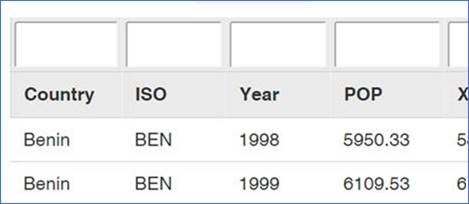
Fig. 1
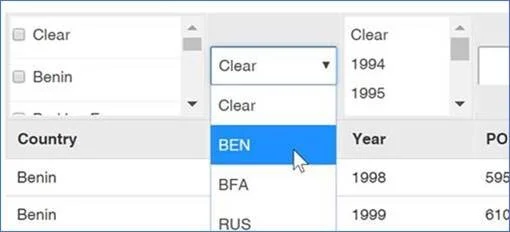
Fig. 2
LIMITATIONS
Now there are caveats here.
While it can do cascading filters based on selected column, multi-selector cascading filters (think Excel) are still on the feature request list (or we can recommend Chosen.JS if you want program it yourself). There is some limitation to the functionality of the library.
However, given it is on an MIT license, it's a very generous framework and Mr Guglielmi has a set of commercial extensions available as well.
So instead of a relatively static table or form which passes filter values back to a second, third etc. REST calls and data refresh, we have a large dataset which we can load, sort, filter and reset quickly and easily.
Some of the limitations we encountered were time to load with very large data sets (20K+ items), especially when using Internet Explorer due to its rendering engine and loading dynamic content, as well as the default 5000 item list threshold on REST calls.
If you’re having similar issues with your SharePoint environment and would like assistance, please contact our Service Delivery Team to arrange for a consultation.
Phone 1300 611 359
Email info@sharingminds.com.au

Cheers,
Rob
Rob.Bayly(at)sharingminds.com.au

Some exciting news has been coming out of Microsoft's latest edition of the Ignite conference (Sept 2017), where more than 25,000 customers and partners converged to talk all things Microsoft.
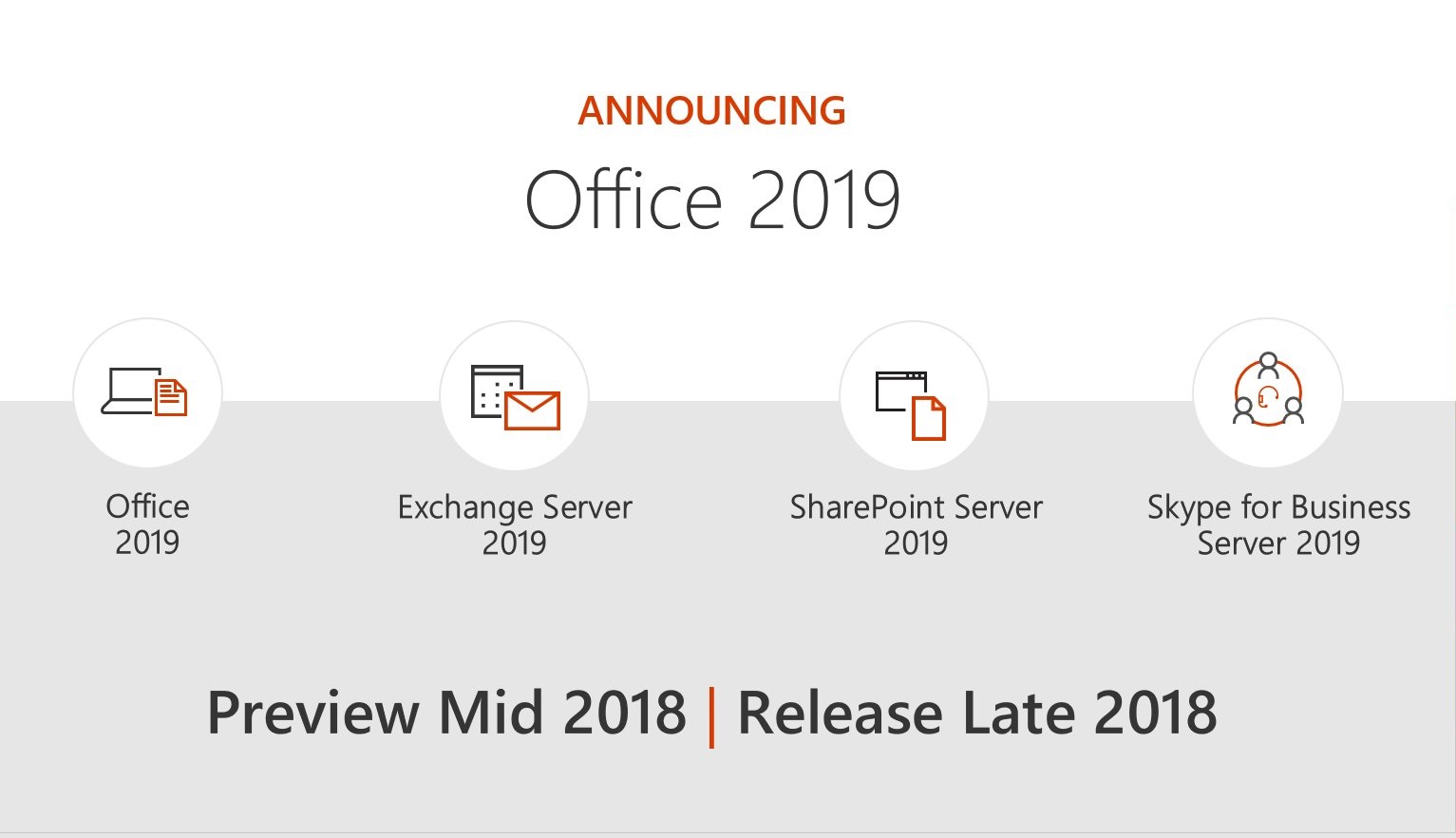
A great deal of announcements were made, including interesting applications of AI and mixed-reality into various products. As you might expect, the announcement we found the most exciting is the pending release of SharePoint 2019, expected in preview as soon as June this year.
Further announcements included big plans to better bridge the gap between on-premise environments and the cloud. While today only 35% of licenses are on-premise (reducing steadily from previous years), Microsoft is clearly still focused on providing businesses with both online and on-premises versions and supporting these with updates and improvements.
Reports from Microsoft MVPs give hope to the future availability of the modern experiences seen in SharePoint online in SharePoint Server 2019. This support could include the availability of modern Team and Communication Sites as well as the new Sync Client, which is said to be a vast improvement over its predecessor. SharePoint 2019 will also bring support for PowerApps, another tool which has become increasingly useful and powerful in SharePoint Online.
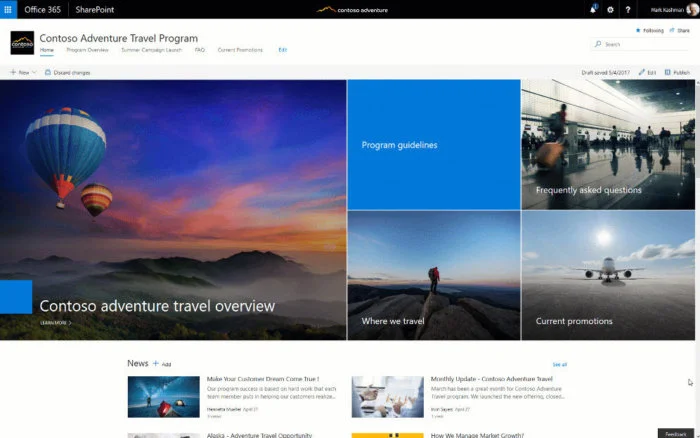
Communication Site
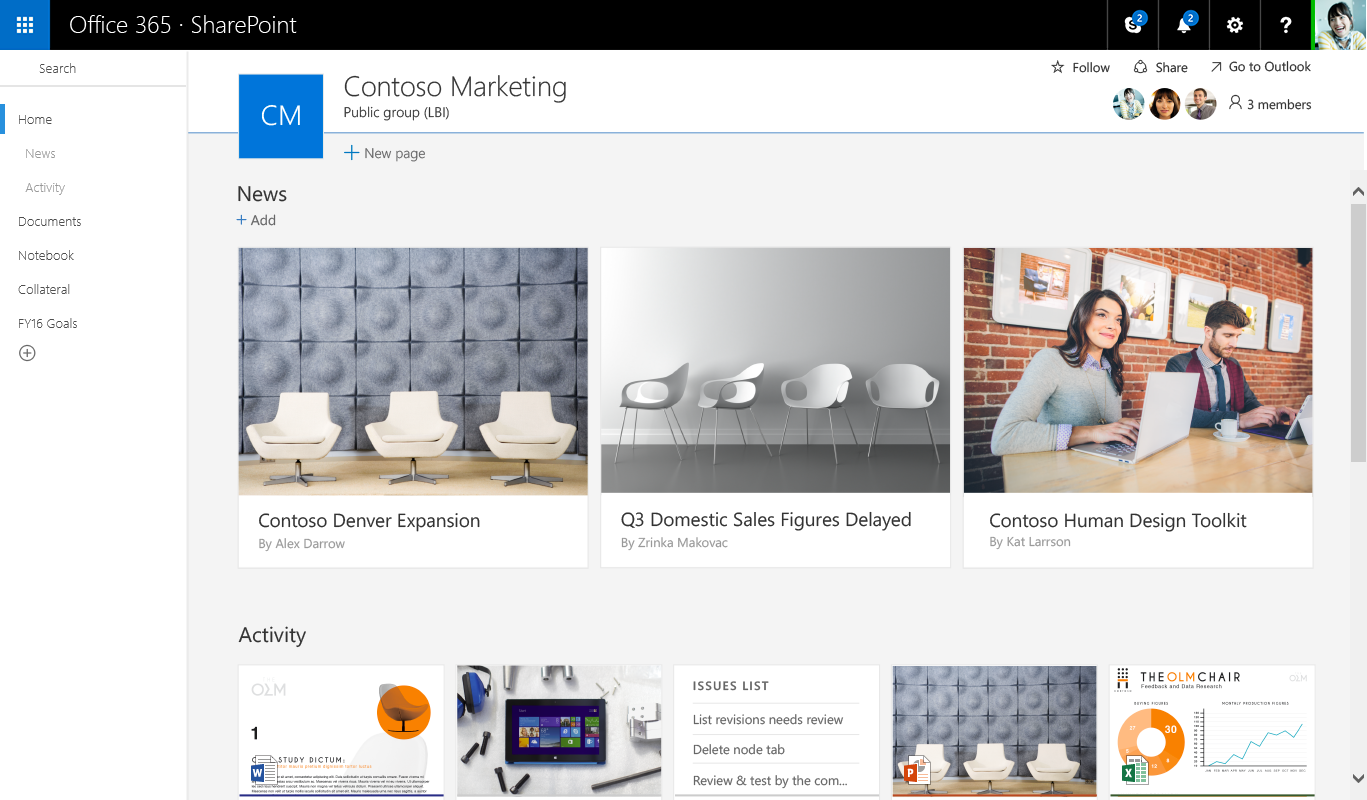
Team Site
Broad plans also encompass the forthcoming Office 2019 productivity suite, as well as Exchange Server 2019, Skype for Business Server 2019 alongside the release of SharePoint Server 2019, outlined in a Collab365 Global Conference keynote talk hosted by Collaboris.
All of this means the next stage of releases will lay the groundwork for a better, more fully featured SharePoint experience no matter whether you are operating on-premise or online. With these platforms right around the corner, now is the time to begin planning how your organisation will evolve alongside.
Would you like some advice on your SharePoint 2019 roadmap? We'd love to help, so please get in touch today.

Cheers,
Jordan
info(at)sharingminds.com.au
![20190520_143546[1].jpg](https://images.squarespace-cdn.com/content/v1/684bb1e871c734107b6fe0f4/1749791250929-48W3WYQRQ61Q8AJQFA0Z/20190520_143546%5B1%5D.jpg)
![20190523_023158[1].jpg](https://images.squarespace-cdn.com/content/v1/684bb1e871c734107b6fe0f4/1749791250941-Z1OYMZQVQ1XNT7OYINT9/20190523_023158%5B1%5D.jpg)
![20190523_124334[1].jpg](https://images.squarespace-cdn.com/content/v1/684bb1e871c734107b6fe0f4/1749791250958-2TV04VVD2AY2X4AJBE0V/20190523_124334%5B1%5D.jpg)
![20190523_134241[1].jpg](https://images.squarespace-cdn.com/content/v1/684bb1e871c734107b6fe0f4/1749791250964-1F0FDAF3L3VTG4HKSPM4/20190523_134241%5B1%5D.jpg)
